
The Event Resource Management platform
Book the meeting. Arm the team. Prove the event worked.
knowhere is event resource management for the team going to the show. Meeting booking, live coordination, and CRM-synced pipeline reporting in one place. Your events team runs it. Your sales team uses it every day.
125 live capabilities across 20 areas of the product
Three pillars
One live record, from the first booking to the pipeline review.
The schedule lives in six places and none of them agree. knowhere is one. Manage every meeting, give the team the context, and see what each event was worth.
Trade show meeting management
Meeting Management
Book it. Run it. Follow up on it.
Most teams rebuild the schedule in a new tool for every phase of the event. knowhere keeps one record for every meeting, from the first request to the last check-in, so every person at the event works from the same plan.
- Before. Public and personal booking pages, Spaces and demo stations, branded calendar invites with RSVP.
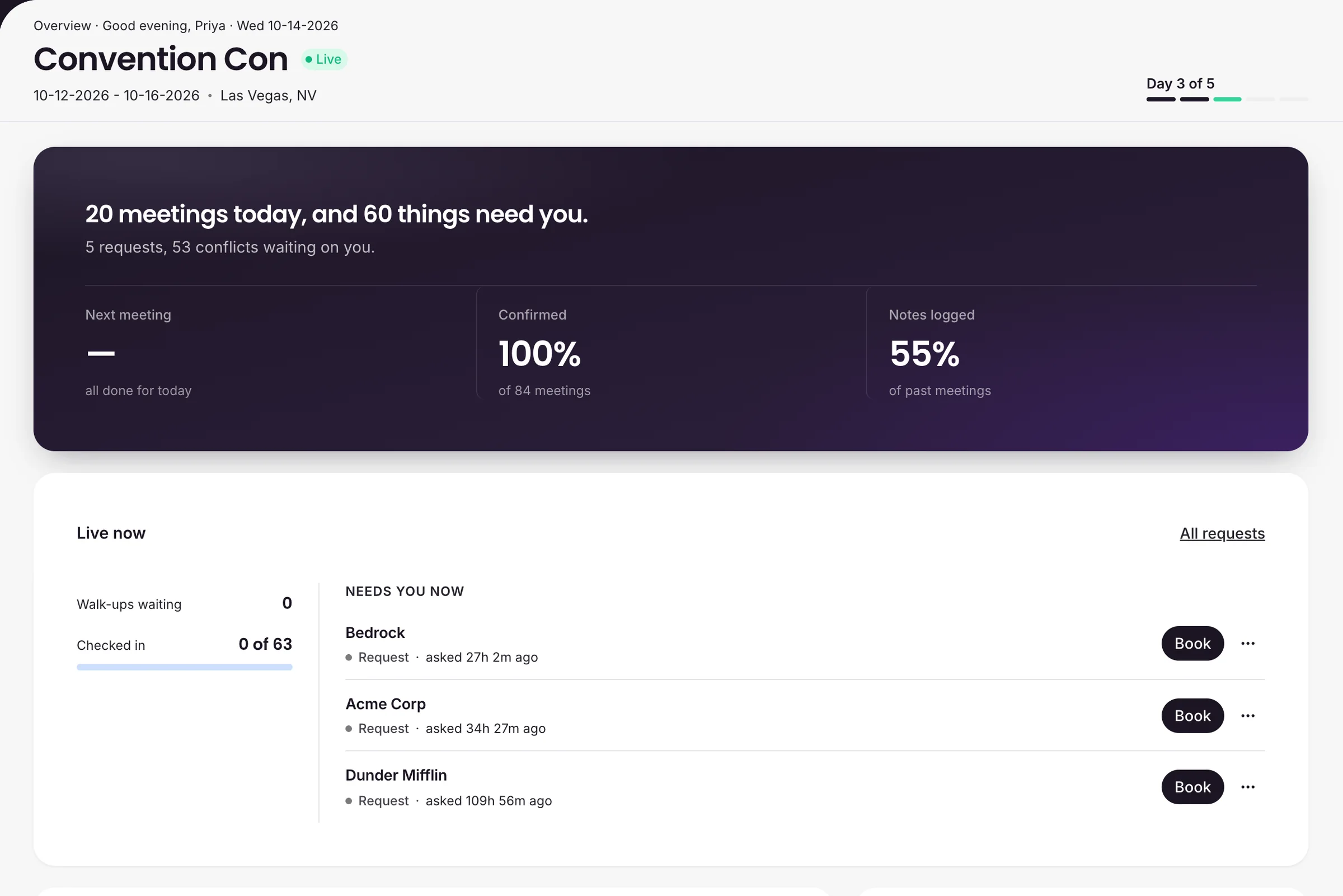
- Onsite. Live schedule by Space and by person, conflict detection, kiosk check-in, and Briefs.
- After. Follow-ups, missing-notes nudges, and guest reschedule requests in one queue.
Public booking
Let customers request time directly.
Share an event booking page or each team member's personal link. Customers request a time, you approve it, and the meeting lands on the schedule with branded calendar invites. Demo stations can confirm on the spot.
AI sales enablement for events
Sales Enablement
Give the team what it needs before it sits down.
Sales walks into a booth meeting cold when the context lives in the events team's head. Targets, Briefs, meeting notes, and Know It All put it in front of the team member who needs it, without a message to the events team.
- Targets and Owners. Tier 1 and Tier 2 priorities, with coverage tracked by Owner.
- Notes and Summary. Shared notes, Recap questions, and an AI Summary of every meeting.
- Know It All. AI event search that answers in plain language and links to the real record.
Target coverage and Summary are on Business and up.
Know It All
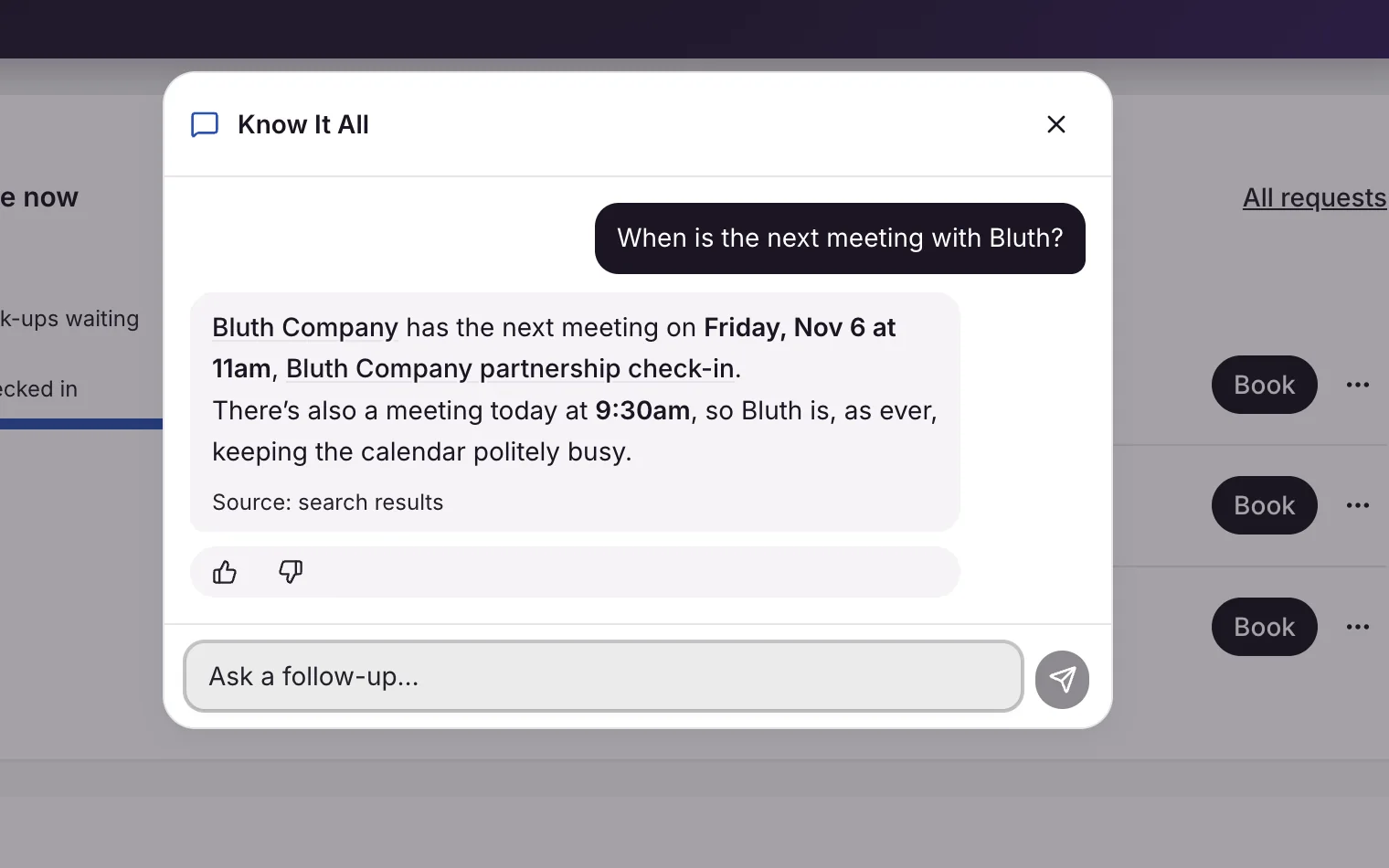
Talk to your event.
Ask about schedules, Spaces, targets, and customer history. Every answer links to the real record. Ask it to set up a meeting and it hands you a pre-filled form to confirm. Managers see the whole company. Team members see their own book.
Event ROI and pipeline reporting
Prove the Impact
See what every event was worth.
After the event, the question is what it produced. Signals shows cost, net, and ROI per event from the costs and revenue you enter. Connect Salesforce or HubSpot and the Pipeline tab shows the open deals on the organizations you met, and how they moved in the 30 days after.
- CRM Sync. Salesforce or HubSpot, with completed meetings and Summaries pushed back to your CRM.
- ROI and cost. Cost per meeting, per organization, and per team member, plus an ROI multiple.
- Spend by event. A portfolio view that ranks every event side by side.
Event ROI is on Business and up. CRM Sync is on Enterprise.
Pipeline
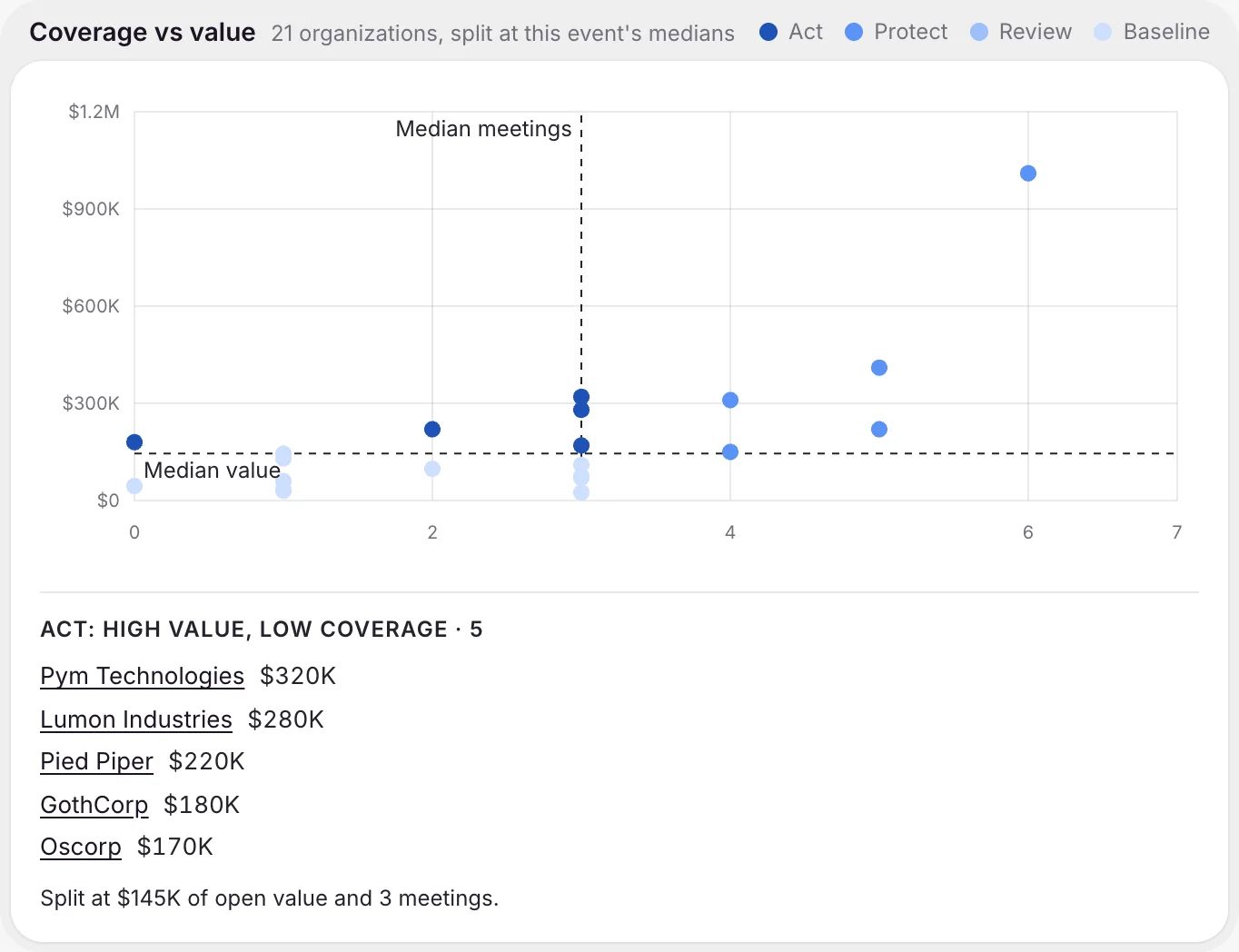
Know which deals you met.
Coverage vs value splits the organizations at an event by open deal value and meetings held, so you see the high-value organizations nobody met while there is still time. knowhere shows the correlation. It never claims a meeting caused a deal.
Everything inside
125 capabilities across 20 areas.
Grouped by pillar. Live features are shipped today. Coming soon items are on the roadmap and subject to change. Some features depend on your plan, noted in each line.
Meeting Management
Events 7 live
- Event creation. Name, dates, location, and timezone for every event.
- Guided setup wizard. Details, Spaces, team, targets, hours, and sharing, step by step.
- Event settings. One rail for meetings, team and targets, booking and check-in, team info, Recap, and budget.
- Event Overview. A day readout, a needs-you inbox, today's meetings, and recent activity.
- Events page. Every event as a list or a calendar, with live and upcoming status.
- Event picker. Pick an event in the top bar and every page follows it.
- Company event defaults. Invite, booking, kiosk, schedule hours, and meeting durations every new event starts from.
Spaces and Demo Stations 4 live
- Spaces. Physical or virtual meeting locations, with location details and capacity.
- Space colors. Each Space gets its own color on the schedule grid.
- Concurrent Spaces. One big Space, like an open booth floor, can host several conversations at once.
- Demo stations. Mark a Space bookable with a demo topic and a fixed slot length.
Meetings 10 live
- Meeting creation. Title, type, time, Space, your team, the customer side, and notes.
- Default durations by type. Picking a meeting type fills in your company's default length.
- Repeat across event days. Create the same standing meeting on the days you pick.
- Duplicate meeting. Copy a meeting with its people, Space, and notes, then pick a new time.
- Optional attendees. Mark a teammate optional so they get the invite without counting as a conflict.
- Holds. Reserve a slot without sending anything until the meeting is confirmed.
- Cancel or delete. Cancel keeps the history. Either way, attendees can get a proper cancellation.
- Personal Time. Travel, lunch, and breaks that protect a slot from booking.
- Imported meetings. Forward a calendar invite to knowhere and it lands on the schedule, read only.
- Meetings page. Every meeting down a date rail, filtered by event, person, type, or status.
Coming soon
- Reusable meeting templates. Save a meeting setup and reuse it.
- Export meetings to CSV or Excel. Pull your full meeting list into a spreadsheet.
Schedule View 6 live
- By-Space grid. Every meeting laid out by Space.
- By-person grid. Every meeting laid out by team member.
- Now line and day scrubber. See where the day stands and move between event days.
- Jump to date. Go straight to any day of the event.
- Click through to the meeting. Open any block on the grid to see or edit the meeting.
- Drag-and-drop rescheduling. Drag a meeting to a new time slot on the grid.
Conflicts and Availability 7 live
- Double-booked people and Spaces. Checked live as you build or edit a meeting.
- Space capacity. The one hard stop. knowhere won't book 12 people into a 6-person Space.
- Availability windows. Arrival, departure, and blocked time slots per person, per event.
- Personal Time and outside calendar blocks. Forwarded invites block your time as private busy time.
- Suggested times. Every conflict alert offers open alternatives you can apply in one click.
- Warn, don't block. Book anyway when the overlap is intentional. The clash stays flagged on the meeting.
- Conflict filter. Conflicted meetings carry a Conflict tag, and the list filters to them.
Public Booking and Requests 11 live
- Event booking page. A branded page with your logo, the event's dates and location, and your welcome message.
- Personal booking pages. A link for each team member, scoped to their real availability.
- Embeddable widget. Put the booking page on your own website.
- Alternate times. Visitors offer backup times with their request.
- Book a demo mode. Visitors pick a demo and grab a fixed-length slot at that station.
- Auto-confirm demo bookings. Optional. A booked demo becomes a confirmed meeting on the spot.
- Request queue. Every request in one place, tabbed by pending, approved, and declined.
- Approve and schedule. Opens the meeting form pre-filled from the request, with live conflict checks.
- Editable booking emails. Write your own submission, approval, and decline emails, per company or per event.
- Bot protection. Public submissions are protected against bots and abuse.
- Link preview branding. Upload the image people see when your booking link is shared.
Coming soon
- QR code for public booking. A scannable code that opens the booking page.
Calendar Invites and RSVP 6 live
- Branded calendar invites. Real invites for Google Calendar, Outlook, and Apple Calendar, with your branding.
- Updates and cancellations. Changes update every attendee's calendar in place, with a summary of what changed.
- One-click RSVP. Accept, Maybe, or Decline from the invite, or from the guest's own calendar app.
- Guest reschedule requests. A guest proposes a new time. The meeting stays put until a manager approves.
- Remove me from this meeting. A guest can bow out, with an optional reason for the owner.
- RSVP alerts. The meeting owner hears about every response by email and in Recent Activity.
Coming soon
- Two-way Google Calendar and Outlook sync. Meetings flow both directions with personal calendars.
Check-In and the Kiosk 6 live
- Kiosk. A tablet at the booth where attendees check in with the six-character code from their invite.
- Walk-ins. Unexpected visitors register on the kiosk and join the live queue.
- Send code to kiosk. Push a meeting's check-in code straight to the kiosk screen.
- Live now queue. Walk-ups and fresh requests stream onto Overview, each with a one-click action.
- Check in on the meeting. Check people in one at a time, or check in everyone at once.
- Attendance summary. Who attended, who walked in, and who never arrived.
Team Management 5 live
- Team invites. Invite by email as a Manager or a Team Member.
- Pending and archived members. Resend or cancel invitations, and reactivate archived members.
- Event staffing. Add people to an event and they get an email with the dates and a link to set up.
- Arrival and departure dates. Set when each person is actually on site.
- Archive or remove. Archive keeps a member's history. Remove frees the seat.
Team Member Experience 6 live
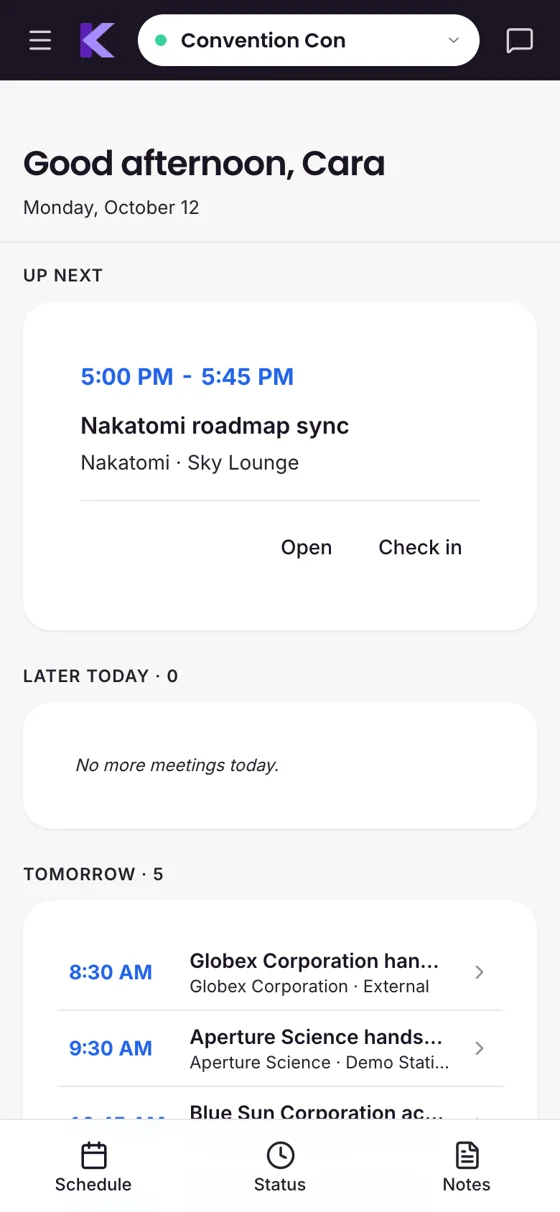
- Same pages, scoped. Team members get the same pages, narrowed to their own events, meetings, and requests.
- Phone tab bar. Schedule, Status, and Notes, one tap apart on a phone.
- Check in from a phone. Today's meetings, built for checking people in as they arrive.
- My targets. The organizations each team member owns, with their engagement at the event.
- My availability. Each team member sets their own arrival, departure, and blocked time.
- Personal booking link. Ready to drop into an email signature before the event.
Coming soon
- Native mobile app. A native iOS and Android app, longer term.
Team Info and Announcements 3 live
- Day-of event view. A countdown and live status for every team member.
- Announcements. Post, pin, and edit updates that reach every team member within seconds.
- Logistics cards. Badge pickup, Wi-Fi, booth, parking, hotel, and more, arranged how you like.
Sales Enablement
Organizations and Contacts 6 live
- Organizations directory. Every customer company in one split view, with Owner, last meeting, and meeting count.
- Organization profile. An event-by-event history of every meeting, note, and Summary.
- Contacts. Built up automatically from meeting attendance and kiosk walk-ins.
- Personas. Seniority and function, read from a contact's title and correctable by hand.
- Leads. Star a contact for follow-up from the contacts table or the check-in roster.
- Owners. One team member responsible for each organization, company-wide.
Targets and Coverage 5 live
- Targets. Flag priority organizations as Tier 1 or Tier 2. Business and up.
- Per-event target lists. Each event picks its own targets from the company list.
- Engagement Scoreboard. Targets covered, met, and booked, by Owner.
- Unmet targets. Targets with nothing scheduled, one click from their profile.
- Coverage-risk alerts. A warning when an Owner isn't staffed on the event.
Briefs 4 live
- One Brief per organization. Pre-filled for every organization you meet at an event.
- Talking points and notes. Editable by managers and the organization's Owner.
- Draft and publish. Mark a Brief reviewed and ready before doors open.
- Who's in the room. Attendees for each meeting, team side and customer side.
Notes, Recap, and Summary 7 live
- Meeting notes. Timestamped notes with @mentions that email the teammate you name.
- Recap questions. Your company's own post-meeting questions on every meeting. Business and up.
- Substance grade. Notes graded Concrete, Directional, or Fluff by a fixed rule. Business and up.
- Summary. Key wins, key points, concerns, and recommended follow-ups, copied in one click. Business and up.
- Generate all Summaries. One click summarizes every meeting in an event that has notes.
- Missing-notes nudge. One email per team member listing their meetings still missing notes.
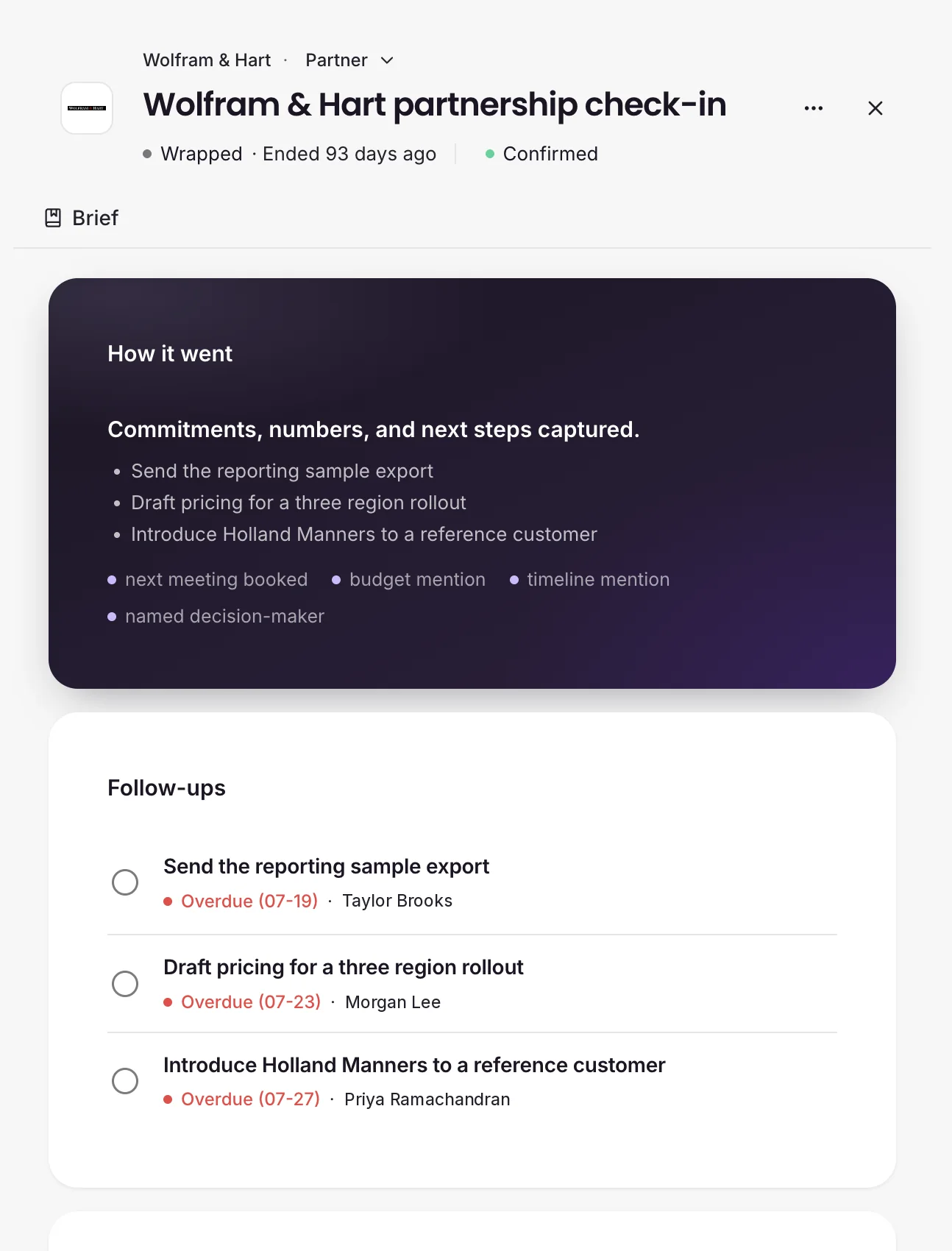
- Follow-ups. Loose ends after the event, including meetings that still need a Summary.
Coming soon
- Meeting recording. Capture meeting audio for detailed notes.
Know It All 8 live
- Search everything. Events, meetings, organizations, contacts, Spaces, and requests, each linked to the record.
- Schedule questions. Agendas, conflicts, free time, and open Spaces in plain English.
- Organization questions. Which targets have no meeting yet, and your history with any organization.
- Outcome questions. What was promised, which meetings went sideways, and how a meeting went.
- Product help. Ask how to do something and get the route through the product.
- It drafts, you book. Ask for a meeting and get a pre-filled, conflict-checked form to confirm.
- Scoped by role. Managers get company-wide answers. Team members get answers for their own book.
- Ask across all your events. One question answered across every event at once.
Sales Inference 3 live
- Four headline cards. Exec coverage of Tier 1 targets, substance rate, follow-ups, and seniority balance. Business and up.
- Commitment ledger. Every promise from meeting notes, with an owner, a due date, and what's overdue.
- Exec earmarks. Exec cancellations, exec no-shows, and downgrades flagged for someone to resolve.
Prove the Impact
Signals and Event ROI 7 live
- Signals. Per-event tabs for readout, themes, follow-ups, pipeline, bookings, engagement, and financials.
- Event costs. Hard costs, booth build, travel, meals, and other, with a running total.
- Attributed revenue. The revenue you credit to the event, entered by you.
- Net result and ROI. Revenue minus cost, and ROI as a return multiple. Business and up.
- Cost breakdown. Where the spend went, by category.
- Cost efficiency. Cost per meeting, per organization, and per team member.
- Portfolio view. Every event's financials side by side, with blended unit costs.
CRM Sync 8 live
- Salesforce and HubSpot. Connect your CRM on the Enterprise plan.
- Pull from your CRM. Organizations, contacts, and open deals come into knowhere.
- Push to your CRM. Completed meetings and their Summaries go back out.
- Sync scope. A CRM list, a filter, a pasted list, or everything recent.
- CRM-aware pickers. Find any CRM organization while you build a meeting, even before it syncs.
- Owners from your CRM. Account owners match to team members by email.
- Pipeline tab. Pipeline in the room, uncovered pipeline, stage mix, deals closing soon, and deal movement in the 30 days after.
- Reporting fields filled automatically. Event history written into your CRM fields after each Summary.
Account
Plans and Billing 6 live
- Three plans. Team, Business, and Enterprise.
- Monthly or yearly. Yearly billing gets you two months free.
- 14-day free trial. Every self-serve plan starts with one.
- Billing portal. Change plan, update payment details, and view invoices yourself.
- Extra seats. Add team member seats without changing plans.
- Clear limits. Locked features show an upgrade path instead of disappearing.
Frequently asked
Questions about the platform
What's included in knowhere's meeting management?
Public and personal booking pages, Spaces and demo stations, branded calendar invites with RSVP, live conflict detection, kiosk check-in, and the Follow-ups that close out an event. Before, during, and after the event run in one system, so the schedule never gets rebuilt in a second tool.
How does Know It All help sales, not just the events team?
Any manager or team member can ask in plain language. A team member can ask which of their targets don't have a meeting yet, or ask for the Brief before a meeting, without waiting on the events team. Managers get company-wide answers. Team members get answers scoped to their own book. Know It All never changes your data. Ask it to set up a meeting and it hands you a pre-filled form to confirm.
Can I see event pipeline and ROI with Salesforce or HubSpot?
Yes, on Enterprise. CRM Sync pulls your organizations, contacts, and open deals into knowhere and pushes completed meetings and their Summaries back to Salesforce or HubSpot. The Pipeline tab in Signals then shows the open deals on the organizations you met and how they moved in the 30 days after the event. Cost and ROI per event come from the costs and revenue you enter in knowhere.
How is this different from a booking tool or Cvent?
Booking tools stop at the calendar invite. Registration platforms like Cvent run the conference for the organizer. knowhere is for the team exhibiting: the meeting-by-meeting coordination during the event, and the pipeline and ROI reporting after it.
Which plan includes target coverage and CRM Sync?
Target coverage, Summary, and event ROI are on Business, at $899 a month, and up. CRM Sync with Salesforce and HubSpot is on Enterprise. Team starts at $249 a month, and every plan starts with a 14-day free trial.
Get started
Your next event is pipeline. Let's prove it.
Setup in minutes. Plans from $249 a month. 14-day free trial.